
How to Play Eldara
Set an action, trust offline ticks, and keep the Codex, bank, and Steam Cloud honest.
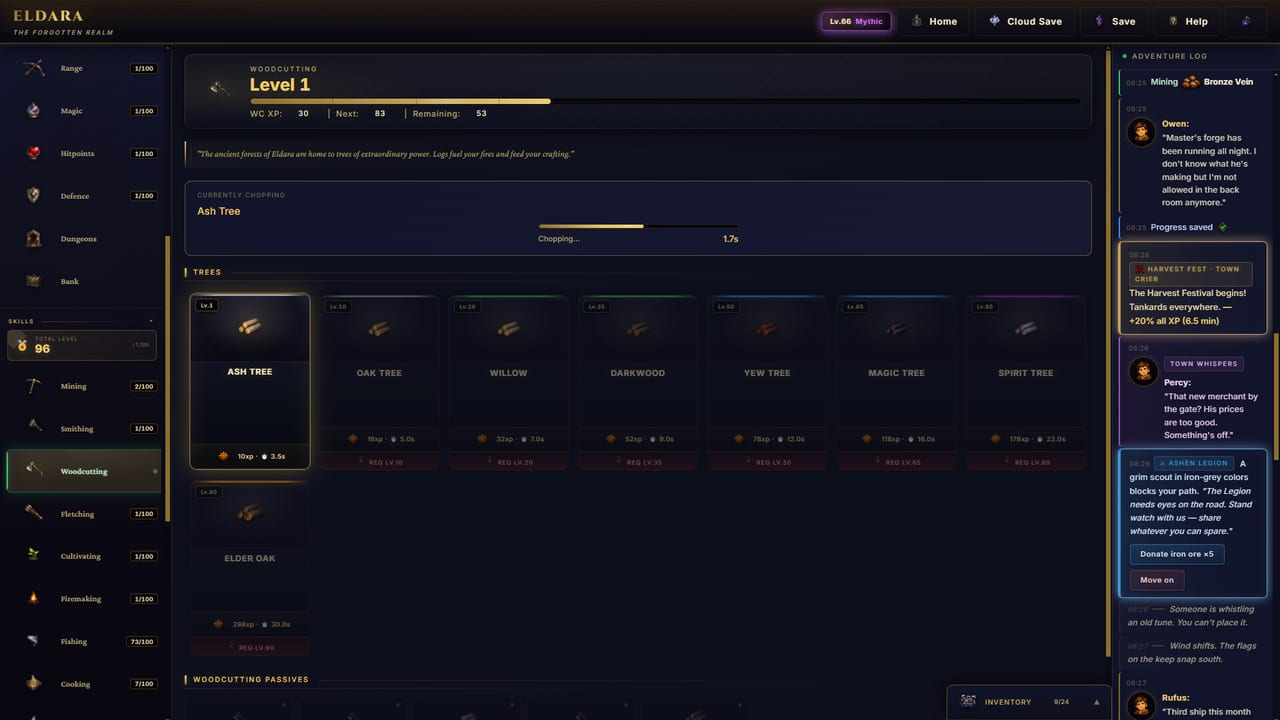
The idle loop, not an action game
Eldara is a single-player idle RPG. You pick a skill action or a combat tile, confirm that food and inventory will survive the next stretch, then let the client tick. You can watch it. You can minimise it. You can close it. The realm keeps a ledger either way. That is the whole verb set. There is no twitch combo, no other player in your instance, and no energy meter that refills if you open a shop.
If you are brand new, pair this page with the first-hour Eldara walkthrough. If you already understand the loop and want to know which bar to push, jump to the full skill web or the skill-route planner.
Version 1.0 released on 2 September 2026. Early Access had already been live since 15 June 2026. The 1.0 client is the one this page describes: seventeen skills, offline progress, Steam Cloud, windowed and fullscreen display, and a Codex that tracks items, monsters, and secrets.
Setting an activity
Every productive minute starts with an explicit action. Open the skill or combat panel, choose a node, a recipe, a monster camp, or a dungeon stage, and confirm you have the tool, ammo, runes, or raw materials that action consumes. The client will then repeat that action until you stop it, you run out of inputs, your bag fills, or — in combat — you run out of hitpoints.
Good activity hygiene looks like this:
- Match the action to a goal (ore for smithing plates, logs for Firemaking heat, fish for auto-eat food).
- Check tool tier. A dull pick on a high vein is a slow night, not a clever AFK plan.
- Check outputs. If the recipe yields a product you cannot bank, you will stall.
- Check combat style. The melee-range-magic breakdown exists because the wrong weapon on the right tile is still a wipe.
- Check house bonuses. Ashen Legion, Verdant Circle, and Gilded Hammer each lean on different clusters; donating against your current action wastes reputation. See the house reputation primer.
You can change activity at any time. Eldara does not punish you for swapping from Mining to Cooking when the bag fills with raw fish. It does punish you for leaving a fight running with an empty plate.
Offline progress and what it is not
Offline progress is the feature that makes the purchase feel honest. Close the game. Come back later. The action you left selected continues in simulated time, subject to the same limits that would have stopped you at the keyboard: empty inputs, full inventory, death in combat, or a dungeon stage that expects a loadout you no longer have.
Treat offline ticks as an extension of a well-set action, not as a second game mode. If you would not leave that fight running while you make tea, do not leave it running overnight. Gathering and production are the offline workhorses. Combat overnight is viable only when auto-eat is stocked, backpacks have space, and the monster is a known quantity.
There is no paid offline booster. There is no second timer behind a paywall. Eldara Games sells a one-time Steam license. That is the whole commercial loop.
Codex, inventory, backpacks, and the bank
The Codex is the in-game wiki you fill by playing. Items, monsters, and secrets land there as you discover them. Use it when a drop name means nothing, when a dungeon roster looks unfamiliar, or when you are deciding whether a bone pile is Cremating fuel or vendor trash. Sixty-eight Steam achievements overlap with Codex milestones; chasing every entry is a long-run hobby, not a first-day requirement. For a narrative pass on bosses and named creatures, keep the mythic boss dossiers nearby.
Inventory is the short-term tray. Backpacks stretch how much a trip can carry before you have to bank. The bank is the long-term warehouse. A healthy session is a conveyor: gather or loot into the bag, dump valuables into the bank, leave a working stack of food and ammo on your person, then reset the activity. Overnight stalls happen most often because a bag filled with ore while you slept and Smithing never saw the bars.
Pets sit beside this logistics layer. Seventeen pets, one per skill, grant permanent domain bonuses and persist through rebirth. Steelfang, Sharpeye, Whisper, and Sprout are the named examples; the rest follow the same rule. You do not equip a pet instead of a backpack — you collect them as skill trophies that keep paying. See the pet bonus list.
Steam Cloud, Steam Deck, and the window
Eldara supports Steam Cloud. Finish a mining stretch on a desktop, close the client cleanly, then open the same save on another Windows machine or on a Steam Deck marked Playable. If a cloud conflict appears, prefer the newer timestamp unless you know you just lost a session. Do not alt-kill the process in the middle of a bank dump.
The game runs in a desktop window by default and supports fullscreen. Windowed is the idle-friendly mode: you can keep a browser, a spreadsheet, or the skill-route planner beside it. Fullscreen is fine on a Deck or a couch display. Neither mode changes XP rates. Neither mode is a graphics flex — this is a 2D idle client, not a ray-traced showcase.
Specs that actually matter
Minimum, from the Steam page:
- OS: Windows 10, 64-bit
- CPU: Intel Core i3 or AMD equivalent from roughly the last ten years
- RAM: 2048 MB
- GPU: integrated graphics with DirectX 11
- DirectX: 11
- Storage: 500 MB
- Sound: any DirectSound-compatible device
Recommended is Windows 10 or 11, an i5 or Ryzen 5, 4 GB of RAM, DirectX 12, and about 1 GB of disk. If you meet minimum, you can play. You do not need a new GPU to fletch arrows. Family Sharing is supported on the store page if another account in the house wants a turn; the save itself remains yours via Cloud.
The interface language is English. Subtitles exist; full voice-over is not the pitch. You can live in windowed mode with the Codex open and a guides overview article on the second monitor. That is a supported way to play, not a workaround.
Putting the loop to work
A practical session, once the client is understood:
- Bank last night’s ore, logs, or fish.
- Cook enough food that auto-eat can survive a mistake.
- Burn spare logs — Firemaking accelerates every other skill.
- Set the main action that feeds your current goal (plates, arrows, gold, dungeon keys).
- If you will be away for hours, prefer gathering or production over an untested dungeon stage.
- When you return, Codex anything new, then decide whether combat, a house donation, or a rebirth is even on the table.
Dungeons and the throne of Ignarath are later verbs. They assume this loop is already boring. Use the dungeon and boss walkthrough when you are ready to stage a run. Rebirth and the Eternal Forge assume you understand what a closed client does to Echoes and gear; that is the rebirth and Forge guide. Hardcore assumes you accept a permanent grave if the loop fails; that is the one-life Hardcore rules.
Patch context lives on the update log hub, with the version 1.0 patch notes and the Early Access recap. Rankings for skills, pets, and loadouts sit on the tier rankings hub. If you want a buyer’s take after the loop clicks, read the post-1.0 Eldara review. Official store, site, and Discord are on the official links page. Extra helpers live on the wiki tools desk.
Learn the window, the bag, and the offline ledger first. Eldara’s systems are deep, but they all sit on top of one honest loop: pick an action that can survive your absence, then let the Forgotten Realm tick without asking you to watch.
Frequently Asked Questions
Quick answers to the most common questions.
Does Eldara keep progressing when I close the game?
Yes. Offline progress continues the activity you left selected until inputs run out, the bag fills, or combat kills you. Set gathering or production overnight unless auto-eat is truly stocked.
What are the minimum PC requirements?
Windows 10 64-bit, an Intel Core i3 or AMD equivalent, 2 GB of RAM, DirectX 11 integrated graphics, and about 500 MB of disk. Windowed and fullscreen both work. Steam Deck is Playable.
What does the Codex track?
Items, monsters, and secrets you discover. It is the in-game log, not a spoiler browser. Boss context also lives on the mythic boss dossiers.
Does Steam Cloud work between PC and Steam Deck?
Eldara supports Steam Cloud. Close the client cleanly so the save uploads, then open it on the other device. Avoid killing the process mid-bank.
Where do I learn combat after the idle loop makes sense?
Read the melee-range-magic breakdown and keep food in the bag. Dungeon staging is covered in the dungeon and boss walkthrough.